ParentSquare
One platform, one place, one easier way to stay connected with E2CCB.


Getting Started With ParentSquare
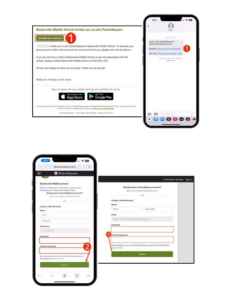
1. Open your invitation email
Open the ParentSquare invitation email and click Activate your account. If you are using a mobile device, youcan also tap the activation link in the message. If you did not receive an invitation email, visit ParentSquare and select Sign In, then register using the email address on file with your school or program.
2. Create your password
Create a password for your ParentSquare account, then click Register.
3. Confirm your contact information
Click Confirm for your phone number and/or email address. A verification code will be sent to the contact method you select. Then enter the code to complete verification.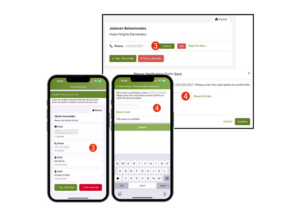
4. Confirm your student information
Review the student or students connected to your account and click Confirm. If a student listed is not associated with your account, select Not My Child.
5. Finish setting up your accountOnce your contact information and student information are confirmed, select Yes, This is Me or Merge Account if prompted.
Need to update your information? To make sure you receive ParentSquare messages, please ensure your contact information is correct in the appropriate student information system. For CTE and P-TECH students, information should be updated in eSchool. For Special Education enrollment, information should be updated in Frontline or through your home school district.
Training and support Once logged in, families can access self-paced training modules, video resources, and help articles within ParentSquare. Users can also select the Help option in ParentSquare to find support information and learn more about how to use the platform.
Download the app
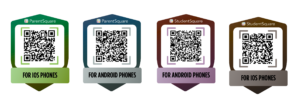
The ParentSquare app is free and available for both Apple iOS and Android devices. Families can download the app by scanning the QR codes on this page or by selecting the download link provided.
Questions?
Any ParentSquare questions may be directed to Mike Rukavina, Director of Communications & Development, at mrukavina@e2ccb.org.
Why You'll Love ParentSquare
ParentSquare gives families one reliable place to receive and manage school communication. Instead of searching through multiple emails, flyers, calls, or messages, families can stay informed through a single platform that keeps important updates organized and easy to access. At E2CCB, ParentSquare helps families stay connected to their child’s school or program by making communication more timely, direct, and convenient.
- Receive announcements, reminders, and urgent alerts in one place
- Get messages by email, text, phone call, or through the app
- Choose notification settings based on personal preference
- Communicate more easily with schools and programs
- Access information from a computer or mobile device
- View messages in a preferred language with translation features
- Stay up to date on events, programs, and important deadlines
📝 How to Sign Up
E2CCB has already pre-registered parent/guardian contact information into the system via eSchool or Frontline data. If your email or phone number is on file with your child’s school:
- Visit www.parentsquare.com/signin
- Click “Sign Up/Create Password”
- Use the email or phone number you provided to your school
- Download the free ParentSquare app from the Apple App Store or Google Play
If you have trouble signing in or didn’t receive an invitation, please contact your child’s school office to ensure your contact information is up-to-date.
Tutorial: ParentSquare Basics
Begin your ParentSquare journey with our Navigate Training! In this training, we cover the basics for getting started with ParentSquare. This training covers the following topics:
- Basic Navigation
- Account Settings
- Posts Direct Messages
Tutorial: Adjusting Your Notifications
Training: ParentSquare Academy
Students and families can build confidence using ParentSquare by exploring ParentSquare Academy, an online training resource with on-demand learning opportunities designed to help users understand the platform and its features. The Academy offers flexible support so families can learn how and when it works best for them. Use the link in this section to access ParentSquare Academy and explore available courses and training resources.
Download the ParentSquare or StudentSquare App
Frequently Asked Questions
What is ParentSquare?
ParentSquare is E2CCB’s communication platform for sharing important information with students, families, and caregivers. It helps keep school and program updates, announcements, reminders, and messages in one convenient place.
Why is E2CCB using ParentSquare?
ParentSquare helps improve communication by making it easier for families to receive timely updates from their child’s school or program through email, text messages, phone calls, and the mobile app.
How do I sign up for ParentSquare?
In most cases, families do not need to sign up manually. ParentSquare uses the contact information already on file with your child’s school or program. You may receive an invitation to activate your account.
What kind of messages will I receive?
Families may receive school announcements, program updates, reminders, event information, urgent alerts, and other important communications from E2CCB.
Can I choose how I receive messages?
Yes. ParentSquare allows users to manage their notification preferences, including how and when messages are received.
How do I get the ParentSquare app?
Families can download the ParentSquare app by scanning the QR codes provided on this page or by clicking the download link.
Do I have to use the app?
No. Families can still receive ParentSquare messages by email, text message, or phone call. The app simply provides another convenient way to view and manage communications.
What if my contact information is incorrect?
To ensure you receive ParentSquare messages, please make sure your contact information is accurate in the appropriate student information system. For CTE and P-TECH students, information should be updated in eSchool. For Special Education enrollment, information should be updated in Frontline or through your home school district.
What is the difference between ParentSquare and StudentSquare?
ParentSquare is the version designed for parents, families, and caregivers, while StudentSquare is the student-facing version of the same communication platform. StudentSquare is the student experience within ParentSquare, giving students a place to receive updates, communicate with teachers, and stay connected to school activities. In practice, the two platforms are very similar, but one is intended for families, and the other is intended for students.
Will ParentSquare translate messages?
ParentSquare includes translation features that can help families read messages in their preferred language.
Who should I contact if I need help with ParentSquare?
Any ParentSquare questions may be directed to Mike Rukavina, Director of Communications & Development, at mrukavina@e2ccb.org.